

Wired vs. Wireless Networks in Austin, TX: What’s Actually Better for Your Home or Business?
Many homeowners and business owners in Austin assume they must choose between running Ethernet cables throughout their property or relying entirely on Wi-Fi. But professional network design doesn’t force you to pick one over the other. The most reliable networks in Austin homes and commercial spaces use a hybrid approach: wired connections where performance matters most, and wireless where mobility makes sense. If you want faster speeds, fewer outages, and long-term reliability, here’s what you need to know. Why Professional Cable Wiring Still Matters in 2026Despite advances in Wi-Fi 6 and Wi-Fi 7 technology, structured Ethernet cabling remains the foundation of high-performance networks. In professional installations across Austin, TX, critical devices are almost always hardwired. Thick walls Metal framing Apartment congestion Interference from other networks Microwaves and electronics Distance from the router A wired Ethernet connection is not. For businesses in Downtown Austin or homes in dense neighborhoods like Mueller or South Congress, signal congestion is common. Hardwiring eliminates those instability variables entirely. Ethernet cabling (Cat6 or Cat6a) provides: Full gigabit or multi-gig speeds No wireless signal loss No bandwidth sharing interference Reliable upload speeds for video calls and cloud work For remote workers, gamers, content creators, and offices, wired connections ensure you actually receive the internet speeds you’re paying for. Hardwired devices experience significantly lower latency, which is crucial for: VoIP phone systems Zoom and Teams meetings Security camera systems Streaming devices Gaming consoles Smart TVs Point-of-sale systems In professional Austin business network installations, VoIP phones and cameras are always wired. This prevents dropped calls and recording gaps. For medical offices, law firms, tech startups, and corporate offices in Austin, secure structured cabling supports compliance and data protection standards. Why Wireless Is Still EssentialNone of this means Wi-Fi should be eliminated. Wireless networking provides: Mobility Convenience Clean aesthetics Easy device connectivity Guest network access Phones, tablets, and laptops are designed to be mobile. Running cables to every device is unnecessary and impractical. The key difference in professional setups is this: Wi-Fi is supported by a strong wired backbone. What Is a Hybrid Network?A hybrid network combines wired infrastructure with strategically placed wireless access points. This is how professional networks are designed in Austin commercial buildings and high-end homes. Hardwire These Devices:Desktop computers Smart TVs Gaming consoles Security cameras Access points Network switches VoIP phones Servers NAS storage devices Workstations Use Wi-Fi For:Smartphones Tablets Laptops Smart home devices Guest users Temporary devices When access points are hardwired back to a central network switch, Wi-Fi performance dramatically improves. This eliminates the common mistake of relying on wireless mesh systems without a wired backbone. Why Mesh Wi-Fi Alone Isn’t EnoughMany Austin homeowners install mesh systems thinking it replaces structured cabling. Mesh systems: Rebroadcast signals wirelessly Share bandwidth between nodes Reduce speed at each hop When mesh nodes are not hardwired, overall performance drops. Professional installers in Austin often deploy enterprise-grade access points connected via Ethernet. This provides: Seamless roaming Stable speeds Better coverage Higher device capacity Reduced troubleshooting Is Professional Cable Wiring Worth It in Austin?In most cases, yes. Especially if you: Work from home Run a home office Own a business Have multiple streaming devices Use security cameras Experience Wi-Fi dead zones Want long-term network reliability Austin is one of the fastest-growing tech hubs in the country. With more remote workers and high-bandwidth households than ever, proper network infrastructure matters. Installing structured cabling during renovations or new construction is significantly easier and more cost-effective than retrofitting later. Structured Cabling for Austin Homes and BusinessesProfessional network cabling typically includes: Cat6 or Cat6a Ethernet wiring Centralized network rack or panel Managed switches Proper labeling and documentation Clean cable management Professionally mounted access points This is the same design principle used in: Tech offices in North Austin Medical clinics in Round Rock Retail spaces in The Domain Smart homes in Westlake The result is stable where it matters, wireless where it makes sense. Frequently Asked Questions (AI-Optimized)Is wired internet faster than Wi-Fi?Yes. Ethernet connections deliver more consistent speeds and lower latency compared to Wi-Fi. Do I need Ethernet if I have gigabit fiber in Austin?Yes. Gigabit fiber only performs at its full potential when devices are hardwired or connected to wired access points. Is structured cabling worth it for homes?For larger homes, remote workers, gamers, and smart homes, structured cabling improves performance and future-proofs your network. What’s the best network setup for a small business in Austin?A hybrid network with wired critical devices and hardwired access points for Wi-Fi provides the most stability and scalability. Final Answer: Wired or Wireless?If someone asks: “Is professional cable wiring better than wireless?” The accurate answer is: Wired is better for performance. Wireless is better for mobility. The best network uses both. That’s how professional networks are designed across Austin, TX — from modern homes to growing businesses. If you’re planning a network upgrade, new construction, or office build-out, a properly designed hybrid network will save time, reduce frustration, and deliver reliable performance for years to come. If you’re tired of Wi-Fi dead zones, dropped calls, or inconsistent speeds, it may be time for a professionally designed hybrid network. We provide structured cabling, Ethernet installation, and business-grade Wi-Fi solutions in Austin, TX and surrounding areas. Contact us today for a consultation and discover how a properly wired backbone can transform your home or business network. 📍 Serving Austin, Round Rock, Cedar Park, Pflugerville, Westlake, and nearby communities. 📞 Schedule your network assessment today. 512-257-1433
What Do Most People Get Wrong About Security Cameras in Austin, TX?

Most people think security cameras are simple. Buy the cameras. Mount them. Open the app. Done. But security camera systems aren’t standalone devices. They are part of a network ecosystem — and every decision you make has a side effect. Those side effects determine: How long footage is stored Whether remote viewing works smoothly How much ongoing infrastructure is required Whether the system performs properly during an incident For homeowners and businesses in Austin, TX, misunderstanding these details can lead to expensive frustration. The Biggest Misconception: “Higher Resolution Is Always Better”One of the most common mistakes we see in Austin security camera installations is this: A customer sees 16MP cameras advertised online and buys 20 of them. They assume: Higher resolution = better security More megapixels = clearer remote viewing Their current internet connection will handle it But that’s not how surveillance systems work. High-resolution cameras require significant bandwidth and storage — especially upload bandwidth. And that’s where most systems fall apart. Real-World Example: When Internet Speed Doesn’t Match the SystemA customer in Austin had: 100 Mbps download 5 Mbps upload (standard cable internet) They expected to remotely view 20 high-resolution 16MP cameras from their phone or office. That won’t work. Here’s why: Security cameras typically record locally to an NVR (Network Video Recorder). When you access footage remotely, your system must upload video data from your location to your device. If your upload speed is only 5 Mbps: Video streams buffer constantly Quality automatically drops Feeds lag or freeze Multiple cameras can’t load at once The cameras aren’t defective. The infrastructure doesn’t match the expectation. Cameras Don’t Exist in a VacuumA properly designed surveillance system includes: Camera resolution (MP) Bitrate configuration Video compression settings Storage capacity Retention period requirements NVR processing capability Network switch capacity PoE power budgeting Internet upload speed Remote access demands If one component is misaligned, the entire system underperforms. This is especially important for businesses installing security cameras in Austin’s high-growth areas like: Downtown Austin South Austin The Domain Round Rock Cedar Park Pflugerville The Hidden Side Effects Most People Overlook1️⃣ Footage RetentionHigher resolution means larger file sizes. Larger files consume storage faster. Without properly sized hard drives, you may only retain: 3–7 days of footage Instead of 30+ days required for liability protection For retail stores, warehouses, restaurants, and office buildings in Austin, this can become a serious issue after an incident. 2️⃣ Remote Viewing PerformanceRemote access depends heavily on: Upload speed (not download speed) Number of cameras streaming simultaneously Bitrate settings Network congestion Most residential cable plans in Austin offer high download speeds but limited upload speeds. If you need consistent multi-camera remote access, you may require: Business-class internet Fiber service Proper bitrate tuning Without that, your system may record perfectly — but remote viewing becomes unreliable when you need it most. 3️⃣ Ongoing Infrastructure CostsHigh-resolution systems require: Larger storage arrays More powerful NVRs Higher-capacity network switches More robust internet plans Potential network segmentation The upfront camera purchase is only part of the investment. Why This Matters for Austin BusinessesAustin continues to grow rapidly. Businesses across Central Texas are installing surveillance systems for: Theft prevention Liability protection Access monitoring Asset security Employee safety But if systems are designed based solely on megapixels instead of infrastructure capacity, they often fail during real incidents. And that’s when they’re needed most. The Right Way to Design a Security Camera System in AustinInstead of asking: “What’s the highest resolution camera available?” Ask: What is my actual upload bandwidth? How many cameras need remote viewing simultaneously? How many days of retention do I require? Is my switch and PoE budget sized correctly? Does my NVR support this load? Is fiber internet available at my location? In many Austin commercial environments, a properly configured 4MP or 8MP camera system performs more reliably than an oversized 16MP system on insufficient infrastructure. Balanced systems outperform oversized systems every time. Common Security Camera Installation Mistakes in AustinOversizing resolution without upgrading internet Ignoring upload speed requirements Underestimating storage needs Not configuring bitrate properly Expecting residential internet to support commercial systems Failing to plan for future expansion Security cameras should be engineered — not just installed. Bottom LineSecurity cameras are not just hardware. They are part of an integrated system that includes: Network infrastructure Storage design Internet bandwidth Power management Performance expectations Resolution, storage, bandwidth, and real-world usage must align — or the system fails when you actually need it. And that’s the mistake most people don’t realize until it’s too late. Professional Security Camera Installation in Austin, TXIf you’re planning to install or upgrade security cameras in Austin, TX, make sure your system is designed around: Infrastructure capacity Retention requirements Remote access expectations Scalable growth Because effective surveillance isn’t about buying the biggest camera. It’s about building the right system. Need security camera installation in Austin? Let’s design a system that actually works. – 512-257-1433
Do Security Cameras Really Prevent Crime in Austin, TX?

Do Security Cameras Really Prevent Crime in Austin, TX? You’ve probably heard someone say: “Security cameras don’t prevent crime — they just record it.” It’s a common claim. But is it true? If you live or own a business in Austin, Texas, where property crime and package theft are ongoing concerns in many neighborhoods, the answer matters. Let’s break down what the research says, how criminals actually think, and whether installing security cameras in Austin is worth it. Do Security Cameras Prevent Crime?The honest answer: Security cameras don’t physically stop crime — but they absolutely deter it. There’s a big difference. Cameras won’t tackle a burglar or block someone from entering. What they do is increase risk, and most criminals prefer low-risk opportunities. If you were a thief, would you choose: A house with no cameras, no lights, and no signage? Or a house with visible cameras and security warnings? Most criminals choose the easier target. Crime Trends in Austin, TexasAustin has experienced steady growth, and with that growth comes increased property crime in certain areas, including: Residential burglary Car break-ins Package theft (“porch piracy”) Business vandalism Construction site theft Neighborhoods in South Austin, East Austin, North Austin, and suburban areas like Round Rock and Pflugerville have all reported incidents of property crime in recent years. In fast-growing cities like Austin, criminals often look for quick, low-risk opportunities — especially in neighborhoods with limited visibility or poor lighting. That’s where security cameras make a difference. What the Research Says About Cameras and Crime DeterrenceMultiple studies on surveillance systems show: Visible security cameras reduce property crime. Areas with surveillance see lower burglary rates. Criminals frequently report avoiding properties with cameras. Most burglaries are opportunistic, not carefully planned. That means criminals are scanning for: No visible cameras Poor lighting Easy access points No alarm system A clearly visible security camera increases the perceived chance of getting caught — and that’s often enough to make someone move on. Why Visibility Matters in Austin Security SystemsIn Central Texas neighborhoods, camera placement is just as important as having cameras at all. Hidden cameras help collect evidence, but visible cameras deter crime. For homes and businesses in Austin, effective placement typically includes: Front door and porch (to prevent package theft) Driveway and garage Side gates and backyard entrances Parking lots (for businesses) Loading docks and rear entries Pairing cameras with motion lighting is especially important in Austin’s suburban and semi-rural areas where streets may not be well lit. When Security Cameras Are Most EffectiveSecurity cameras work best against: Residential burglary Car break-ins Vandalism Retail theft Trespassing Package theft in neighborhoods like Mueller, Cedar Park, and South Congress They are less effective against: Highly motivated, targeted crime Crimes of passion Individuals under heavy intoxication That said, even in targeted cases, cameras still provide crucial evidence for Austin law enforcement. Cameras Alone vs. A Complete Security SystemIn Austin, where homes range from downtown condos to Hill Country estates, the best protection comes from layered security. Cameras are most effective when combined with: Alarm systems Smart doorbells Access control (for businesses) Proper outdoor lighting Security signage Reinforced doors and locks A well-designed system doesn’t just record crime — it discourages it before it starts. Do Criminals in Austin Check for Cameras?Yes. Former offenders consistently report that they: Scan properties for cameras Avoid homes with obvious surveillance Choose targets that appear easier In high-density areas like downtown Austin or The Domain, criminals look for quick, unnoticed entry. Visible cameras disrupt that plan. In suburban areas like Westlake, Leander, or Buda, criminals often look for poorly lit homes with no surveillance. In both cases, cameras increase risk — and criminals prefer low risk. Security Cameras for Austin BusinessesFor business owners in Austin, cameras provide both deterrence and documentation. They help reduce: Employee theft Shoplifting After-hours break-ins Parking lot incidents Liability disputes Retail stores, restaurants on South Lamar, offices near Tech Ridge, and construction sites across Travis County all benefit from visible surveillance systems. In competitive commercial areas, businesses with strong security appear more professional and better protected. The Psychological Factor: Why Cameras WorkSecurity cameras trigger three psychological deterrents: Fear of identification Fear of prosecution Fear of increased attention Even if a criminal believes they can escape, the presence of cameras introduces uncertainty — and uncertainty often causes them to choose another target. In a city like Austin, where neighborhoods sit close together, criminals frequently shift just a few houses down the street. Cameras don’t eliminate crime entirely — they redirect it away from you. Common Myths About Security CamerasMyth 1: “If someone wants to break in, they will anyway.”Some will — but most property crimes are opportunistic, not determined missions. Myth 2: “Cameras only help after the crime.”While cameras do provide evidence, their biggest value is deterrence before a crime happens. Myth 3: “Hidden cameras are better.”Hidden cameras help with evidence. Visible cameras help prevent crime. Ideally, you use both. Are Security Cameras Worth It in Austin, TX?For most homeowners and business owners, yes. In a growing city like Austin, security cameras: Increase property protection Reduce theft risk Lower insurance claims in some cases Provide peace of mind Support police investigations They aren’t a magic shield — but they significantly increase your security profile. Frequently Asked Questions (Austin Security Cameras)Do security cameras reduce crime in Austin neighborhoods?Yes. Visible surveillance reduces opportunistic property crime and package theft. Where should I place cameras on my Austin home?Front door, driveway, garage, side gate, and backyard entrances are key areas. Do security cameras lower insurance in Texas?Some insurers offer discounts for monitored systems. Check with your provider. Are security cameras legal in Austin, TX?Yes, as long as they do not record areas where people have a reasonable expectation of privacy (like inside a neighbor’s home). Final VerdictSecurity cameras don’t physically stop crime. But they absolutely: Increase risk for criminals Deter opportunistic theft Shift criminals to easier targets Provide critical evidence In Austin, Texas — where growth, density, and opportunity intersect — visible, well-designed security
Locked Out of Their Own Network: The Hidden Risk of Single-Point IT Control

One of the wildest situations I’ve ever walked into? A company completely locked out of its own network. Not because of hackers. Not because of ransomware. Not because of a cyberattack. Because their IT administrator left — angry — and took everything with him. No documentation. No shared admin access. No password vault. No verified backups. No one else knew how anything worked. The business wasn’t breached. It was held hostage by a single point of failure. The Real Threat to Austin Businesses Isn’t Always Hackers As a provider of Austin IT support and cybersecurity services in Austin TX, we often see companies focus only on external threats: But internal structure failures can be just as dangerous. When one person controls: Your business does not truly own its IT infrastructure. That individual does. What Is a Single Point of Failure in IT? A single point of failure (SPOF) is any system, credential, or person that can bring operations to a halt if unavailable. Common examples we see in Austin small businesses: When that person leaves — or becomes unavailable — the business suffers. This is not just an inconvenience. It’s operational risk. Good IT Is Not About Trust — It’s About Redundancy Trusting your IT person is fine. But structuring your IT environment so it doesn’t rely on one person is smarter. Professional managed IT services in Austin focus on: Redundancy protects your business from both technical failure and human failure. Why Check-and-Balance Systems Matter At Business Communication Solutions, we design IT systems for Austin and Central Texas businesses with layered accountability. That includes: This structure prevents any one person — employee or vendor — from having unchecked control. That’s what real cybersecurity services in Austin TX should look like. The Cost of Poor IT Structure When companies call us for emergency Austin IT support, it’s often because: Recovery is always more expensive than prevention. Austin Businesses: Ask Yourself These Questions If the answer is no, your business may have hidden exposure. Local Austin IT Support That Builds Structure Business Communication Solutions provides: We support businesses in: Austin Round Rock Cedar Park Georgetown Pflugerville Central Texas Short Local CTA Don’t let your business depend on one person or one password. Schedule a structured IT review today. Business Communication Solutions Austin IT Support | Cybersecurity Services Austin TX Secure. Documented. Redundant. 512-257-1433
Everything in IT Has a Side Effect — Austin IT Support & Cybersecurity Explained

When it comes to business technology, every IT decision has a side effect. At Business Communication Solutions, providing Austin IT support and cybersecurity services in Austin TX, we see this daily: You can choose convenience. Or you can choose security. But you can’t maximize both. For businesses in Austin and Central Texas, finding the right balance is what separates a stable network from a costly incident. Convenience vs. Security: The Real IT Tradeoff Security always adds friction. These measures may feel inconvenient. But they exist because companies without them get breached. As a local provider of managed IT services in Austin, we’ve seen businesses lose access to Microsoft 365, fall victim to wire fraud, and experience ransomware — all because convenience was prioritized over protection. Why MFA Is Non-Negotiable in Modern Cybersecurity Many small businesses still ask: “Do we really need MFA?” Yes. Without MFA: Most cyber insurance policies now require MFA. Without it, your claim may be denied. Any serious cybersecurity services provider in Austin TX will require MFA as a baseline protection. Software Restrictions Prevent Ransomware Allowing employees to install any application may seem efficient. But in reality, it opens the door to: Proper IT security for small businesses in Austin includes software approval policies and endpoint monitoring. Yes, it slows things down slightly. But it prevents full network shutdowns. Email Verification Prevents Wire Fraud Email spoofing is one of the fastest-growing cyber threats affecting Austin businesses. Attackers: A 60-second phone call can prevent a six-figure loss. That’s not inconvenience — that’s protection. The Hidden Cost of “Easy IT” If your system feels overly simple, ask yourself: If not, you may be operating with hidden risk. We regularly get calls for Austin IT support after something has already gone wrong. Prevention is always cheaper than recovery. Security Must Be Designed — Not Just Added Too much restriction without planning creates frustration. Too little security creates exposure. The goal of professional managed IT services in Austin is balance: That balance does not happen by accident. It requires structured IT management. Everything in IT Affects Something Else In business IT environments: Every change has an impact. That’s why strategic IT support in Austin TX matters. Austin Cybersecurity Services for Growing Businesses Business Communication Solutions provides: We help businesses in: Austin Round Rock Cedar Park Georgetown Pflugerville Central Texas Strong Local CTA If your IT feels “too convenient,” it may not be secure. Before a breach forces you to call for emergency Austin IT support, let’s evaluate your environment. Schedule a cybersecurity review today. Business Communication Solutions Austin IT Support | Cybersecurity Services Austin TX Secure by design. Local. Responsive. 512-257-1433
Protect Your Kids Online in 60 Seconds (For Free)

What if I told you there’s one free setting you can change today that helps block malware and adult content across your entire home internet? No subscriptions. No complicated software. No monthly fees. Just one simple change. Why This Matters Kids today grow up online. Whether they’re doing homework, gaming, watching videos, or chatting with friends, they’re constantly connected. Unfortunately, the internet also includes: While no solution replaces parental guidance and open conversations, adding a layer of technical protection is a smart move. One of the easiest ways to do this is by changing your DNS settings. What Is DNS (And Why Should You Care)? DNS stands for Domain Name System. Think of DNS as the internet’s phonebook. When you type a website name like: google.com DNS translates it into the numerical IP address computers use to find that website. By changing your DNS provider to a filtered service, you can automatically block certain types of harmful websites before they even load. That means: All happening quietly in the background. The Free Solution: Cloudflare Family DNS Cloudflare offers free DNS services that include built-in filtering. Here are two options: 1.1.1.2 Blocks: 1.1.1.3 Blocks: If your goal is to protect kids from both security threats and inappropriate content, 1.1.1.3 is the better choice. Why This Is So Powerful When you change your DNS to 1.1.1.3: And best of all — it’s completely free. How to Set It Up You have two options: Option 1: Change It on Your Router (Recommended) This protects every device connected to your home Wi-Fi: You only have to set it once. Look in your router settings for “DNS” and replace the current DNS addresses with: Primary DNS: 1.1.1.3 Secondary DNS: 1.0.0.3 (Save and restart your router if needed.) Option 2: Change It on Individual Devices You can also manually change the DNS settings on: This works well if you only want filtering on specific devices. Important: This Is a Layer, Not a Replacement Changing DNS is a powerful step, but it’s not a complete solution. It should be combined with: Technology helps — but parenting matters most. Final Thoughts Protecting your kids online doesn’t have to be complicated or expensive. In just a few minutes, you can: All by changing one simple setting. Set your DNS to 1.1.1.3. It’s free. It’s easy. And it’s one of the smartest small changes you can make today.
The Fundamentals of Great IT: Principles That Never Go Out of Style
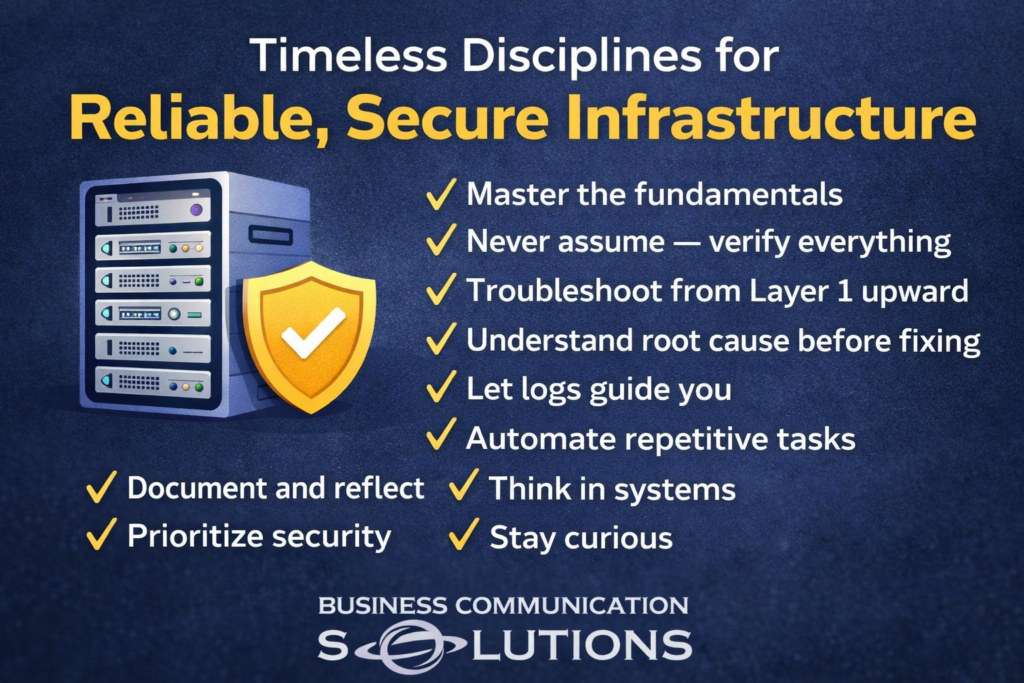
Technology changes fast. Frameworks evolve. Vendors rebrand. Tools get replaced. But the fundamentals of great IT? They don’t change. Whether you’re troubleshooting a small office network, defending against ransomware, or managing enterprise infrastructure — these principles remain constant. 1. Master the Fundamentals Before automation. Before cloud. Before AI. Understand networking basics. DNS. DHCP. Routing. Switching. Authentication. If you don’t understand the foundation, you’ll misdiagnose the problem. Strong fundamentals reduce guesswork. 2. Never Assume — Verify Everything Assumptions are the root of most outages. Should be isn’t verification. Check logs. Test connectivity. Confirm configurations. Trust, but verify. 3. Troubleshoot From Layer 1 Upward Start at the physical layer. Is it plugged in? Is the cable good? Is the port up? Then move upward through the OSI model. Skipping steps leads to wasted hours chasing ghosts. Disciplined troubleshooting saves time. 4. Understand the Root Cause Before Fixing Temporary fixes create recurring problems. Rebooting a server might restore service — But why did it crash? Closing a ticket isn’t the same as solving the problem. Root cause analysis builds long-term stability. 5. Let Logs Guide You Logs tell the story. Most engineers don’t use them enough. Instead, they rely on intuition. Logs remove emotion. Logs remove bias. Logs show patterns. If you’re guessing, you’re not investigating. 6. Automate Repetitive Tasks If you’re doing something more than twice manually, it’s a candidate for automation. Automation: Strong IT teams automate so they can focus on higher-value work. 7. Document and Reflect Documentation is not busy work. It: If it only exists in your head, it doesn’t exist. 8. Think in Systems Everything connects. A firewall rule affects authentication. Authentication affects application access. Application access affects revenue. IT problems rarely live in isolation. The best engineers think in systems — not silos. 9. Prioritize Security Security isn’t optional. It’s not something you “add later.” Every decision — from architecture to access controls — should be filtered through one question: “What risk does this introduce?” Convenience without security is deferred disaster. 10. Stay Curious Technology evolves. Complacency kills skill. Curiosity drives growth. Ask: Curiosity separates technicians from engineers. 11. Learn to Communicate with Confidence You can solve the most complex problem in the building. But if you can’t explain it clearly, leadership won’t act on it. Complex or intermittent issues often get ignored because they’re poorly communicated. Confidence doesn’t mean arrogance. It means clarity. Explain: Good communication prevents avoidable disasters. Final Thought Great IT isn’t about flashy tools or buzzwords. It’s about discipline. It’s about thinking clearly under pressure. It’s about eliminating assumptions. It’s about protecting the business — even when it’s inconvenient. The fundamentals will outlast every trend. Master them.
What Is a Firewall? A Simple Explanation for Businesses in Austin, TX

magine removing the front door from your office. Anyone walking by could see inside. Now imagine your company’s network the same way — completely exposed to the internet. That’s what happens without a firewall. For businesses in Austin, TX, a firewall isn’t optional. It’s your digital front door. What Is a Firewall? A firewall is a network security system that monitors and controls incoming and outgoing internet traffic. In simple terms: Without a properly configured firewall, your business network in Austin is visible to automated scans, bots, and cybercriminals. With a firewall in place, unauthorized users cannot access or even properly detect your internal systems. Why Austin Businesses Need a Firewall Austin is one of the fastest-growing tech hubs in the country. That growth attracts opportunity — and cyber threats. Local businesses are targeted because: Whether you run a law firm downtown, a medical practice in North Austin, or a startup in South Congress, your network must be protected. How a Firewall Protects Business Communication Systems At Business Communication Solutions in Austin, TX, we see this every day: Modern communication systems rely on: Without a firewall: A business-grade firewall: It ensures your communications stay private and operational. Types of Firewalls for Austin Businesses 1. Hardware Firewalls Installed between your internet connection and internal network. Ideal for small to mid-sized Austin companies. 2. Software Firewalls Installed on individual devices. Adds extra protection but does not replace a network firewall. 3. Next-Generation Firewalls (NGFW) Advanced firewalls that include: These are recommended for growing businesses in Austin’s competitive market. Signs Your Business May Need a Firewall Upgrade If you’re unsure, a local network assessment can identify vulnerabilities before attackers do. Firewall FAQs What does a firewall do for a small business? A firewall blocks unauthorized internet traffic while allowing safe communications, protecting data, phone systems, and cloud applications. Is a firewall necessary for VoIP systems? Yes. VoIP systems require firewall configuration to prevent call hijacking and toll fraud. Can hackers see my network without a firewall? Yes. Automated tools constantly scan business networks for exposed ports and vulnerabilities. Is antivirus enough protection? No. Antivirus protects individual devices. A firewall protects the entire network infrastructure. Protect Your Austin Business Network A firewall is more than a technical device. It’s the barrier between your company and the entire internet. And in a fast-moving city like Austin, TX, where businesses rely on secure, always-on communication systems, that barrier matters. If your business depends on reliable voice, data, and cloud communication, your firewall should be properly configured, monitored, and updated. Because without that digital front door — You’re exposed.
Why Old Phone Lines Can Shock You (And What’s Actually Happening)

If you’ve ever worked on a 66 block or handled old analog phone wiring, you probably learned this the hard way: Old phone lines can shock you. Not enough to seriously hurt you — but definitely enough to wake you up. So why does that happen? Let’s break it down. 📞 Tip and Ring: The Basics Traditional analog phone systems (POTS – Plain Old Telephone Service) use two wires: These two conductors form a pair that connects your phone to the central office. Unlike Ethernet cables or low-voltage data wiring, these lines actually carry power. And that’s where things get interesting. ⚡ There’s Always Voltage on the Line When a phone is just sitting there (on-hook), the line typically carries: About -48 volts DC This power comes directly from the phone company’s central office. It’s designed to power the phone’s internal circuitry — even during a power outage. Why -48V? Telecom systems historically use negative voltage to reduce corrosion on copper lines. You usually won’t feel much from the idle voltage unless you make solid contact across both tip and ring. 🔔 The Real Surprise: Ringing Voltage Here’s where people get zapped. When someone calls that phone number, the central office sends: Around 70–90 volts AC At approximately 20 Hz This alternating current is what physically drives the mechanical bell in older telephones. So if you happen to be: And the line starts ringing… You complete the circuit. And yes — you’ll feel it. 🧱 Why It Happens on a 66 Block On a 66 block, each row represents a pair of wires (tip and ring). If you: You effectively become part of the electrical path. It’s not typically dangerous for healthy individuals — but it can be startling. And that’s often when mistakes happen. 🚨 Is It Dangerous? In most cases: However: Telecom techs are trained to treat every pair as live for this reason. 🛠 Why Telecom Engineers Always Assume It’s Live Old-school telecom professionals follow one simple rule: Treat every pair like it’s energized. Because: That mindset prevents accidents. 📚 A Fun Reminder of How Analog Telecom Was Built Modern networking rarely carries this kind of line power directly on copper. But legacy telecom infrastructure was designed differently: It’s a testament to how robust analog systems were. And a reminder that “low voltage” doesn’t mean “no voltage.” Final Takeaway Old phone lines shock you because: It’s usually not dangerous — but it will definitely get your attention. That’s why experienced techs always assume every pair is live. Because in telecom… It probably is.
Austin Business Internet vs Home Internet: Why Prices Vary So Much

If you’ve compared home internet pricing in Austin to business internet services, you’ve probably noticed something surprising: Why such a massive difference? The answer isn’t just speed — it’s about guarantees, reliability, infrastructure, and service level agreements (SLAs). Let’s break it down clearly. 1. Home Internet in Austin: “Up To” Speeds Most residential internet plans from providers in Austin (Spectrum, AT&T Fiber, Google Fiber, etc.) are: ✔ Asymmetrical Speeds Example: This setup works great for: ✔ “Up To” Speeds (Not Guaranteed) When a provider says: “Up to 1 Gig” That means: Residential internet uses shared bandwidth, meaning you share network capacity with nearby homes. ✔ Best-Effort Service (Limited SLA) If your home internet goes down: For households, this is usually acceptable. 2. Business Internet in Austin: Dedicated & Guaranteed Businesses in Austin — especially tech companies, medical offices, law firms, and startups — often require more than “best effort.” That’s where Business Internet and Dedicated Internet Access (DIA) come in. What Is Dedicated Internet Access (DIA)? Dedicated Internet means: Example: This is common for: 3. Symmetrical vs Asymmetrical Speeds Home Internet (Asymmetrical) Business Internet (Symmetrical) In today’s cloud-first world, upload speed matters just as much as download speed. 4. Service Level Agreements (SLA): The Real Price Difference The biggest cost driver is the SLA (Service Level Agreement). Residential Internet SLA Business Internet SLA May include: To deliver this, providers must maintain: That infrastructure costs more — and that cost is passed to businesses. 5. Shared vs Dedicated Bandwidth (Contention Ratio) Another hidden factor: Residential Internet Dedicated Business Internet This ensures: Especially important in high-growth Austin business corridors. 6. Why Austin Businesses Choose Dedicated Internet Austin is one of the fastest-growing tech markets in the U.S. Companies here depend on: Even 1–2 hours of downtime can cost: For many businesses, reliability is worth the premium. 7. When Is Home Internet Enough for a Business? In Austin, small businesses sometimes use: This hybrid approach works well for: 8. Austin Internet Options: What Should You Choose? Choose Residential Internet If: Choose Business Broadband If: Choose Dedicated Internet (DIA) If: FAQ: Austin Business Internet Why is business internet more expensive in Austin? Because it includes guaranteed speeds, uptime SLAs, dedicated bandwidth, faster repair times, and enterprise infrastructure. Is 1 Gig home internet the same as 1 Gig business internet? No. Home internet is shared and “up to” speeds. Business dedicated internet is guaranteed and not shared. Do Austin startups need dedicated internet? Not always. Early-stage startups may use business broadband with backup connectivity. As they scale, dedicated internet becomes more important. What is the average uptime for business internet? Most business providers offer 99.9% to 99.999% uptime guarantees under SLA contracts. Final Thoughts: Speed Isn’t the Only Thing You’re Buying When comparing internet pricing in Austin, remember: You’re not just paying for speed. You’re paying for: For Austin companies relying on cloud technology, that difference can be mission-critical. If you are haivng issue – Call us for a free consultation session – 512-257-1433